
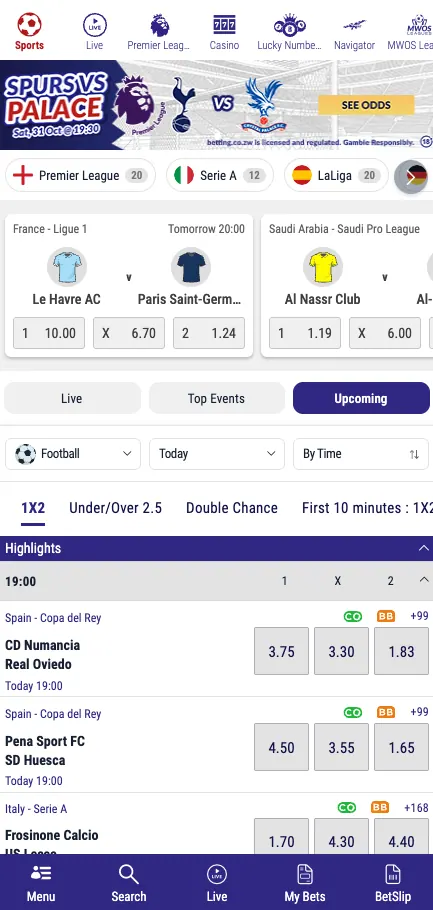
Moors Betting, known to many players by the short name MWOS (Moors World of Sport), runs its online service for players in Zimbabwe. To place a bet online you first need an account, and the MWOS betting login is what brings you back to it each time. This page covers both halves: how to register, and how to sign in without trouble.
Betting at a shop terminal is a different thing from an online account. Terminal slips are paid over the counter, while the online account holds your balance, bet history and bonus status. If you searched for "terminal betting MWOS login", the account described here is the online one.
18+ only · Zimbabwe
Who can register
Registration is open to adults only. The minimum age is 18, and you must be playing from Zimbabwe, where betting is licensed by the Lotteries and Gaming Board. Each person may hold one account. Duplicate accounts, or an account opened with someone else's details, can be blocked together with any winnings.
Use your own real name and phone number. They must match your documents later, when verification is requested.
How to register on Moors Betting
Registration step by step
Open the site
Go to the Moors Betting site and press the Register button in the top right corner.
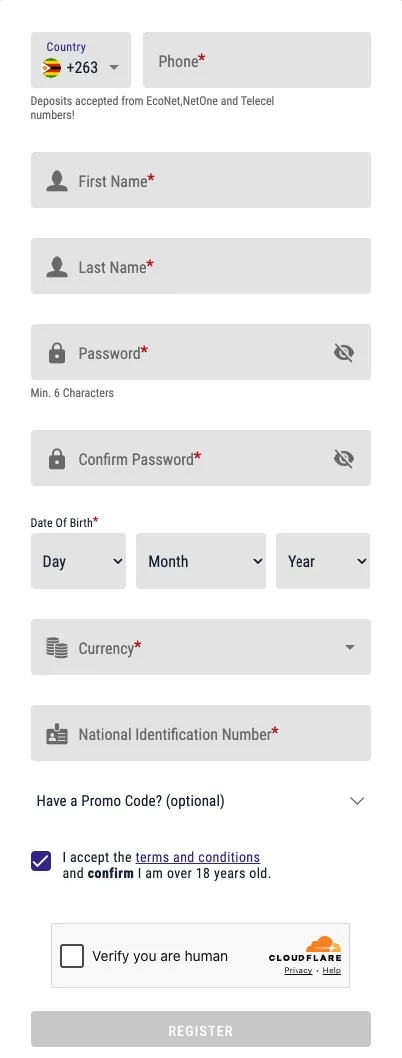
Fill in the form
Enter the details the form asks for: your phone number or email, a password and your personal data. Write them exactly as they appear on your ID.
Confirm you are 18+
Tick the boxes confirming your age and that you accept the Terms and Conditions. Read them first; they set out the rules for bets, bonuses and withdrawals.
Confirm your contact
If a code is sent to your phone or email, enter it to confirm the account. Never pass this code to anyone.
Make a first deposit
Open the cashier and top up your balance with an Econet, NetOne or Telecel wallet, or in cash at a Moors shop. A welcome offer needs a qualifying deposit; see the Moors Betting bonus guide.
The whole process usually takes a few minutes. The exact fields and confirmation options can change, so follow what the current form shows on screen.
Registration data at a glance
| Item | What is needed | Why |
|---|---|---|
| Contact | Phone number and/or email | Login and account recovery |
| Personal data | Full name, date of birth | Age check, payouts |
| Password | Your own, unique | Account security |
| Confirmation | Code or link, if requested | Proves the contact is yours |
Choosing a currency
The operator's help pages say that deposits can be made in US dollars, South African rand and Zimbabwe dollars, and that the currency is selected when the account is set up. Pick the one you will actually deal in. A balance in one currency does not convert on its own, so think about how you will deposit and withdraw before you decide.
Registering through a Moors shop
Moors also runs a retail network, and the shop route is part of the account flow. After creating the account online and choosing a currency, a customer can go to the nearest outlet and ask the teller to make a deposit. The teller issues a deposit code, which is entered under Deposit with the payment method Shop. Withdrawals mirror this: the account generates a code that is sent by email, and cash is collected at a shop with that code and the account details.
It is the reason the email address and phone number on the account must be real and reachable. Codes sent to a mailbox you cannot open cannot be recovered at the counter.
Account verification (KYC)
Before a withdrawal, the operator may ask you to prove who you are. This is standard for licensed betting and protects you as much as the operator. Typically the request covers a national ID or passport and, sometimes, proof of the payment account used for deposits, such as the mobile wallet number.
- Send clear, uncropped photos, with all four corners visible.
- The name must match the one in your account.
- Expect the check to take from a few hours to a couple of working days.
Tip
Verify early. A document check done before your first big win means the payout is not held up later.
What the operator may ask for
Beyond the ID document, a verification request can cover the following. Having these ready cuts the waiting time.
- A clear photo or scan of the front and back of the national ID, or the passport photo page.
- Proof that the mobile wallet or bank account used for deposits is in your name.
- A recent document showing your address, in case of a larger withdrawal.
- A short answer to a security question or a call to the number on the account.
Requests come by email or through the live chat. The operator also publishes a KYC policy at the bottom of its website; read it if you want the exact list. Verification protects the player as much as the operator: it stops someone else from withdrawing your winnings.
MWOS betting login
Once registered, signing in takes seconds. Press Login in the header, enter the phone number or email you registered with, then your password. Use the same steps whether you search for "Moors login", "Moors betting Zimbabwe login" or "MWOS betting online login": it is one account on one service.
- Open the official Moors Betting address in your browser, or the MWOS betting app.
- Tap Login.
- Type your login and password.
- Press the confirm button. Your balance and bets appear in the account menu.
If your browser offers to remember the password on your own phone or computer, that saves time. Do not enable it on a shared device. In the app, the same details work: log in once and the app keeps you signed in until you log out.
Password recovery
Forgot the password? Use the Forgot password link under the login form. A reset code or link goes to the phone or email on the account, and you then set a new password. If you no longer have access to that number, contact support and be ready to confirm your identity.
Common login problems
| Problem | What to try |
|---|---|
| "Wrong password" | Check Caps Lock and the keyboard language; then reset the password. |
| Code does not arrive | Check mobile signal and the spam folder, wait a minute and request a new one. |
| Page will not load | Check your data connection, clear the browser cache or try another browser. |
| Account blocked | Contact support; a block often follows failed attempts or a pending verification. |
| Unfamiliar address | Type the official address yourself; copies with similar names can be fake. |
Managing your account
Under the account menu you can follow your bet history, balance and bonuses. Some changes are not made by hand. A new phone number or email, or a correction to your name or date of birth, normally goes through support with proof of identity. That stops someone else from taking over your account.
To close or delete the account, write to support and ask for it; withdraw any balance first. If you want a break from betting, ask for a time-out or self-exclusion instead.
If you lose access
If the password reset fails because the email or phone number is gone, the live chat and the help centre are the way back in. Open a ticket from the help centre or write from the email address on the account, describe the problem and attach the same identity documents used at verification. Do not accept help from anyone who contacts you first and asks for a code, a password or a payment to restore the account.
Several devices
The same login works on a phone browser, a computer and the app. Use a different password from your email and wallet, log out on shared devices and check the bet history now and then for activity you do not recognise.
Before your first bet
Read what the account page shows about limits and the history, check the currency on the balance, and place a small first bet to see how the betslip behaves. A low stake on a simple market is the cheapest way to learn the screen, and it leaves the welcome offer, if you want it, for a deposit you have thought through.
Keeping the account safe
- Choose a long password you use nowhere else.
- Never share codes, passwords or your phone with anyone, including people claiming to be support.
- Log out on shared devices.
- Treat links in messages and social media with caution; type the address yourself.
18+ only
Betting should be entertainment, not a way to make money. Set a deposit limit you can afford and stop if it stops being enjoyable.
Frequently asked questions
How do I register on Moors Betting?
Press Register on the site, fill in the form with your real details, confirm that you are 18+, confirm your contact if a code is sent, and log in. Then make a deposit to start betting.
What is the MWOS betting login?
It is the sign-in to your Moors Betting (MWOS) account. You use the phone number or email and password you chose at registration.
I forgot my password. What should I do?
Use the Forgot password link under the login form and follow the code or link sent to your phone or email. If you cannot access them, contact support.
Can I log in to Moors Betting from the app?
Yes. The same login and password work in the Android app.
Do I have to verify my account?
Verification may be requested, usually before a withdrawal. You send an ID document, and sometimes proof of your payment account.
How do I change my phone number or email?
Contact support with proof of identity. These details are not usually edited freely, for security reasons.
How old must I be to register?
You must be at least 18 years old and play from Zimbabwe. One account per person is allowed.
How can I close my account or self-exclude?
Ask support to close the account or to apply a time-out or self-exclusion. Withdraw your balance first.